Instagram is one of the first places a prospective client checks before booking a class, and with more than 3 billion monthly active users, it functions as your studio's second storefront. But the rules have changed. Over the last two years, Instagram capped hashtags at five per post, switched the profile grid to vertical tiles, opened public posts to Google search, and rebuilt ranking around watch time and shares. Effective Instagram marketing for fitness studios looks different than it did even a year ago.
These 12 Instagram tips for fitness studios are updated for how the platform works today, so your profile doesn't just look good; it supports your broader boutique fitness marketing strategy and drives bookings.
How to Optimize Your Fitness Studio's Instagram Profile
Why is your studio on Instagram? The most common answers are building community, increasing brand awareness, and driving sales, usually intro offer sign-ups. Write your goals down, attach a number to each (for example, intro offer bookings from Instagram per month), and review them monthly. Every tip below should serve at least one of them.
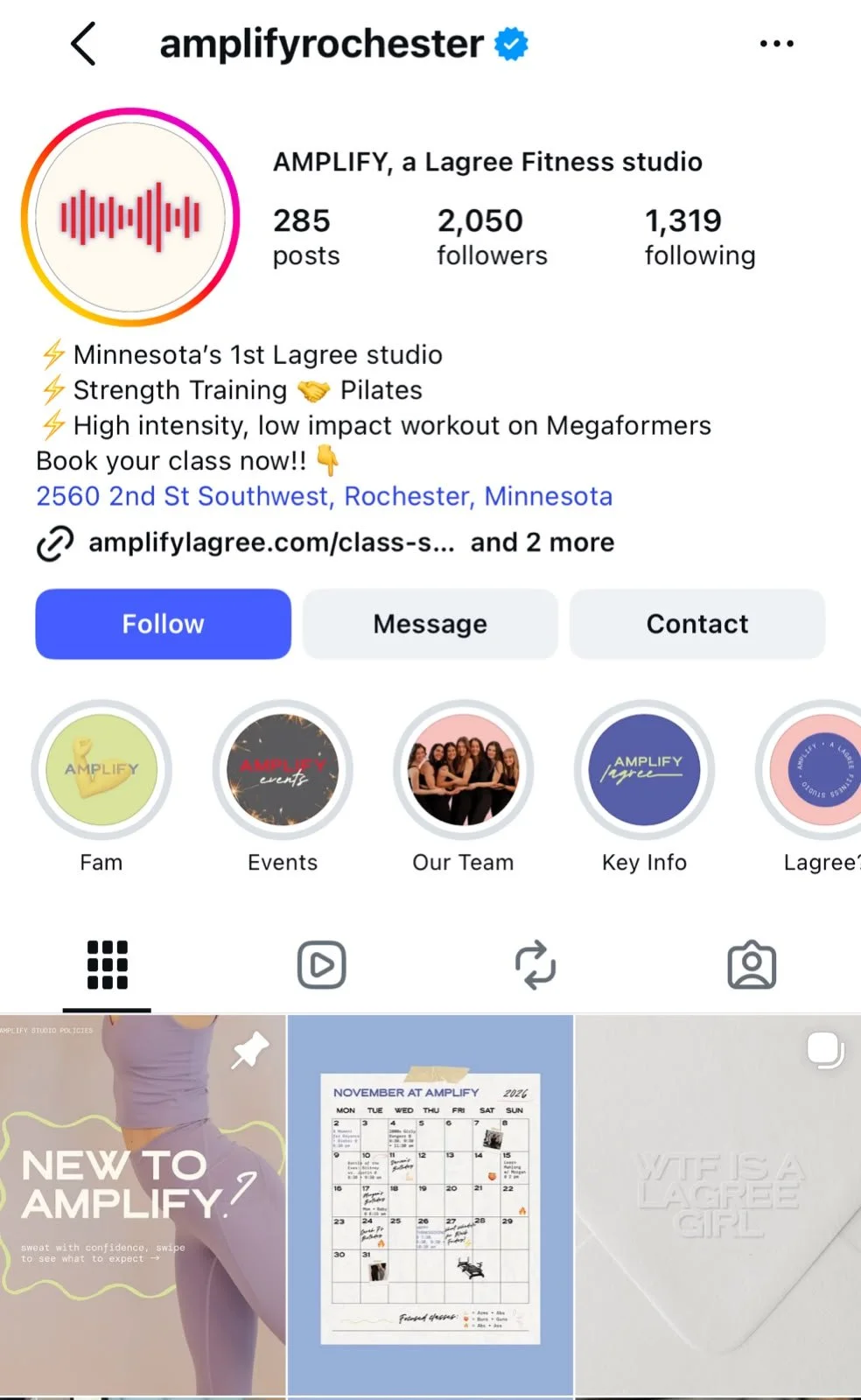
01. Treat Your Fitness Instagram Bio Like a Landing Page
Your profile is where a curious scroller decides whether to book or bounce, so every field should earn its place.
Name field: This is separate from your handle and is searchable inside Instagram. Use it for keywords, not just your studio name, for example "Reformer Pilates | Austin" or "Hot Yoga Studio Denver."
Bio (150 characters): State who you serve, what makes you different, and what to do next. "Small-group reformer Pilates in East Nashville. New here? Your first class starts below" does more work than a mission statement.
Links (up to five): Instagram now allows five native links, but only the first one shows on your profile, with a count of the rest. Put your intro offer booking page first and give every link a clear title, such as "Book Your First Class," "Class Schedule" or "Gift Cards." Add UTM parameters so you can see which link drives bookings.
Category, location and contact buttons: Set your category to your modality and add your address so local searchers can find you. If your booking platform integrates with Instagram's action buttons, add a Book button.
Story Highlights: Use them as a visual FAQ: New Here, Schedule, Pricing, Instructors, Reviews. A first-timer should be able to answer "What do I wear?" and "Where do I park?" without sending a DM.
Pinned posts: Pin up to three posts to the top of your grid. Pin your intro offer, a client testimonial and a studio tour.
02. Write Captions That Hook Readers and Help You Get Found
You have 2,200 characters per caption, but only the first line or two (roughly 125 characters) shows before "more." That first line has two jobs: stop the scroll and tell Instagram, and now Google, what the post is about.
• Lead with the hook and the keyword. "Never tried reformer Pilates? Here's what your first class in Austin looks like" beats "Happy Monday!"
• Go long when you have something to say. Longer captions (microblogs) give you space to tell an instructor's story, explain a format, or share a client milestone. They're also more searchable text.
• End with one clear action. Ask a question, invite people to save the post, or prompt them to send it to the friend they'd take to class. Shares sent by DM are one of the strongest signals Instagram uses to show content to new people.
• Mix it up and track it. Test short versus long and question versus story, then check which drives saves, shares and profile visits.
03. Make Your Studio Photos and Visuals Earn the Stop
You don't need a professional camera, but you do need intent. Good light, a clean background and a clear subject, like an instructor cueing or a full class mid-flow, matter more than gear. Shoot real moments so prospective clients see the room and community they'll actually walk into, and get written consent before featuring clients.
Edit for consistency, not perfection. Lightroom Mobile, VSCO and Snapseed handle color, while Instagram's Edits app and CapCut cover Reels. Skip body-altering filters, which undermine trust for a fitness brand. And if you don't have a strong photo, a clean branded graphic beats a blurry phone shot.
04. Optimize Your Posts for Instagram SEO and Google Search
Since July 2025, public posts from professional (business and creator) accounts can appear in Google and Bing search results. That means a well-written post can show up when someone searches "Pilates studio near me" or "best spin class in Calgary."
• Confirm you're eligible. Use a public business or creator account and check that search engine indexing is turned on in your privacy settings.
• Write like a searcher. Use your modality, neighborhood and city naturally in captions, on-screen text and your name field.
• Add alt text. Describe each image in plain language ("Instructor leading a reformer Pilates class in a sunlit studio") under Advanced Settings before you post.
• Use hashtags as labels, not reach hacks. Instagram now caps hashtags at five per post or Reel, and the cap applies across your caption and comments combined. Choose specific tags that describe the post, such as #ReformerPilates or #AustinFitness, over generic ones like #fitness or #viral.
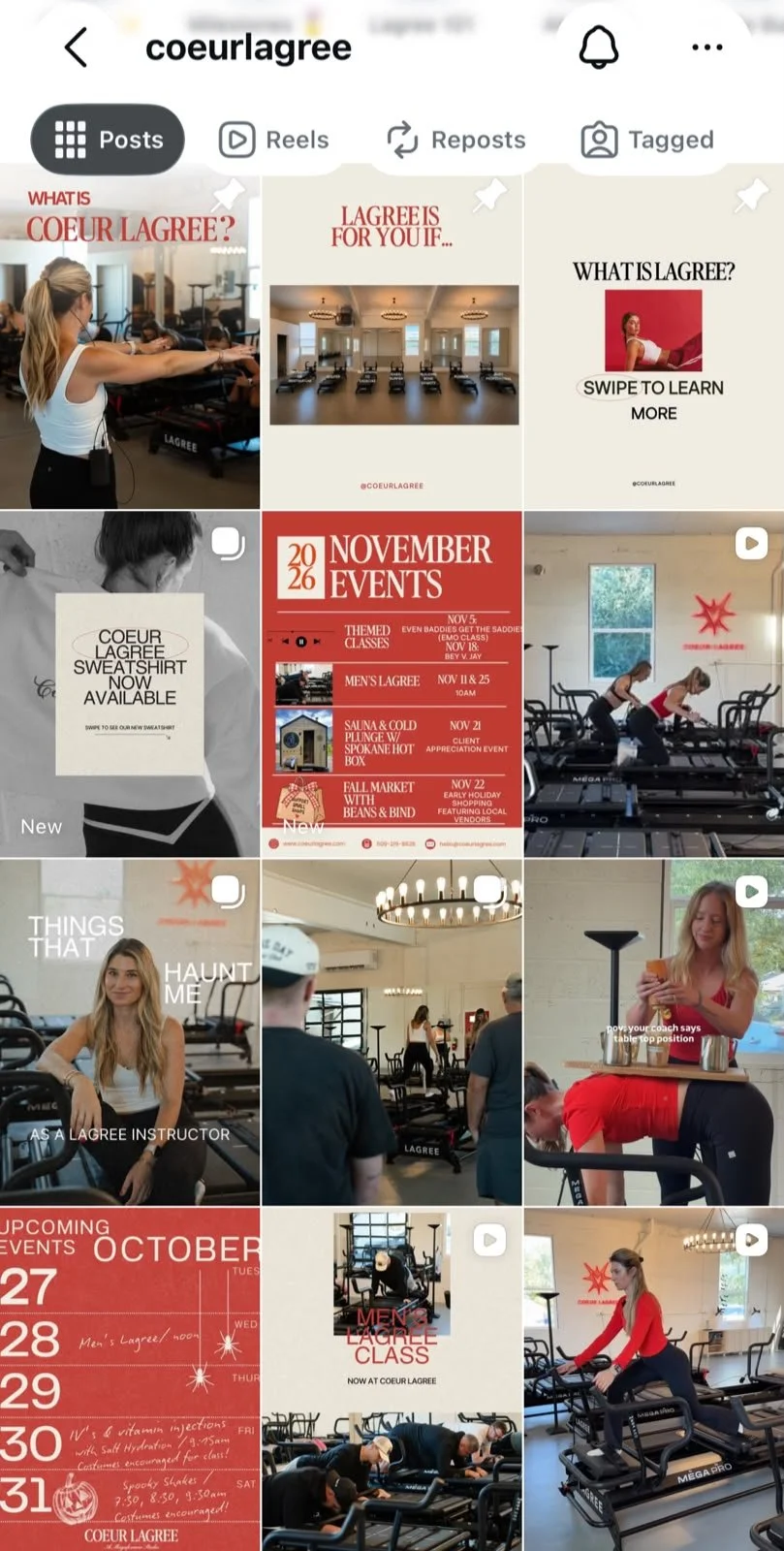
05. Build a Cohesive Grid Aesthetic for the New Vertical Layout
Step back and look at your grid. Does it feel like one brand? Your posts should share a consistent palette, lighting style and type treatment.
Keep in mind that the grid changed in 2025. Profile thumbnails now display as vertical 3:4 rectangles instead of squares, and every post is cropped to fit. Design at 4:5 (1080 x 1350 px) or 3:4 (1080 x 1440 px), keep faces, text and logos centered, and check older square graphics that may now look clipped.
06. Plan and Schedule Your Studio's Content With a Calendar
A content calendar keeps you posting consistently, keeps your content engaging and fresh, and ensures you never miss a launch, workshop, challenge or holiday schedule change. For each post, plan the format, publish date and time, caption, hashtags, alt text and any collaborators.
Rotate through a few content pillars, such as education, community, behind the scenes and conversion, and batch-film several Reels in one session to schedule through Meta Business Suite or your scheduling tool. One caveat: collab posts and product tags can't be added to posts scheduled in the Instagram app, so publish those manually.
07. Make Your Instagram Shoppable
If your studio sells retail like grip socks, apparel or water bottles, you can tag products in posts and Stories through a product catalog in Meta Commerce Manager. Tapping a tag now sends clients to your website to check out, since Instagram retired in-app checkout in 2025.
For classes, your real product, keep it simple: put your intro offer link first in your bio, add link stickers to Stories, and answer pricing questions in DMs with a direct booking link.
08. Engage Your Fitness Followers, Don't Just Collect Them
A large following does nothing for your studio if people don't interact. Instagram's head, Adam Mosseri, has named watch time, likes and sends (shares by DM) as the signals that matter most for ranking, and sends carry the most weight for reaching people who don't follow you yet.
Give followers a reason to share ("Send this to your Pilates partner") and to save (form tips, playlists, first-class guides). Reply to comments and DMs quickly and, with permission, reshare clients' posts and milestones. User-generated content is social proof you can't create yourself.
09. Use Collab Posts to Tell Your Studio's Story Across Accounts
Instagram's Collab feature lets you co-author a feed post, carousel or Reel with up to five other accounts. The post appears on every collaborator's grid and pools likes and comments, so you reach each partner's audience without paying for it.
Strong partners include instructors with their own following, local businesses that share your clients (a juice bar, athleisure boutique or physical therapist), retail brands you stock, and clients celebrating milestones. You can also tell a story across accounts: start a studio reveal on your account, then continue it in a collab Reel with a partner. Plan ahead, since collaborators are invited at the time of posting.
10. Use Carousels for Big Reveals and Step-by-Step Stories
Splitting one image across several grid posts (the puzzle feed) no longer works reliably. Since the grid switched to vertical tiles, Instagram crops each post on your profile, so the seams don't line up and every new post shifts the layout.
Carousels do the job better. With up to 20 photos or videos in a single post, they're ideal for revealing a retreat, launching a new location or format, teaching a move step by step, or walking a first-timer through their first visit. Every swipe also keeps people engaged with your content longer.
11. Elevate Your Stories Game by Making Them Interactive
Stories are where your existing community checks in daily, and interactive stickers turn viewers into participants. Use a countdown for a launch or retreat, polls and quizzes for quick wins ("Which playlist for Saturday's ride?"), the question sticker for an "Ask the Instructor" session, and Add Yours to collect client studio selfies. The link sticker sends viewers straight to booking.
For deeper engagement, go Live for an instructor Q&A or a walkthrough of a challenging pose, where viewers' comments appear in real time. Save the replay to your Highlights.
12. Lead With Reels and Mix Your Content Formats
Instagram ranks Feed, Reels, Stories and Explore with separate systems, and it shows people more of the formats they interact with most. Reels are the main way non-followers discover new accounts, so they should anchor your strategy, supported by carousels, static posts and Stories. (IGTV no longer exists. Longer videos are now Reels, which can run up to three minutes.)
Win the first three seconds. Open with movement, a bold on-screen text hook or a question, because watch time is the top ranking signal.
Add on-screen captions. Many people watch without sound.
Test with Trial Reels. Trial Reels are shown only to non-followers first, so you can test a new format or hook without affecting how your current audience sees your account.
Keep it original. Instagram favors original content, so avoid reposting videos with other apps' watermarks.

Need Help with Your Social Media and Fitness Studio Marketing?
Is your Instagram building your studio, or just keeping it busy? Telomere helps boutique fitness studios turn social media into a growth channel, from full social media management to a strategic Instagram audit that shows you exactly what to fix first.